AWS Open Source Blog
Announcing ml-container-creator for easy BYOC on SageMaker
AWS is excited to announce the awslabs/ml-container-creator open source project to simplify the process of building and deploying custom machine learning models on Amazon SageMaker. Some customers face challenges when trying to leverage the bring-your-own-container (BYOC) paradigm for hosting their predictive models on Amazon SageMaker AI‘s managed serving infrastructure. There are myriad ways to deploy and serve predictive and generative models, each featuring their own benefits. The flexibility can be dizzying, raising questions like: do I serve the model with Flask or FastAPI? Should I be using vLLM or SGLang? What is the best way to implement the necessary API endpoints for SageMaker AI? By generating the boilerplate code and configuration files needed for a lean, performant BYOC-style container, this project frees up machine learning (ML) teams to focus solely on their predictive workloads, performance, optimization and security, without having to worry about the complexities of containerization.
Ml-container-creator provides an easy-to-use, guided process that allows customers new to BYOC to start hosting their models immediately. Its also offers flexibility for more advanced users to customize the generated assets. Customers can quickly deploy their models using their preferred machine learning frameworks, including scikit-learn, xgboost, TensorFlow, and more, on cost-effective CPU or GPU-accelerated instances in the AWS cloud.
SageMaker AI allows customers to leverage BYOC for hosting custom predictive models on managed serving infrastructure. Customers can include their preferred libraries, dependencies and algorithms to facilitate predictive inference using SageMaker AI Managed Endpoints. By using BYOC, data scientists and ML engineers do not have to consider first-party requirements (such as implementing the /ping API endpoint for healthchecks) for containerized model workloads. ML teams have the bandwidth to focus on the performance, optimization and security of their ML workloads when they’re not managing boilerplate code.
Moreover, generated BYOC assets give customers full control to keep the container lean, using only the packages needed by their model. By navigating the guided generation process, customers can start hosting models immediately using templatized assets generated by this solution. This REPL style engagement is powered by a Yeoman generator built on simple decision logic which can seen in the index.js file at the root of the repository.
How does ml-container-creator work?
The ml-container-creator project works by injecting templated variables into boilerplate files using the open source Yeoman scaffolding framework. Yeoman generators prompt users for answers to questions, generating templated files using user-provided inputs. Yeoman generators can introduce branching logic, open-ended fields, and conditional generation to ensure the resulting generated files are suited to the user’s specifications.
A typical project will have the following structure, depending on the options selected during generation:
Consider the requirements.txt file. When a user generates a BYOC-style container using the xgboost framework, Yeoman injects the xgboost dependency into the requirements file. Similarly, if the user selects scikit-learn as the preferred predictive framework, Yeoman injects the scikit-learn and joblib dependencies using a templating syntax, shown here.
The ml-container-creator generation script features branching logic as well. Customers have the option to generate a sample training and inference script using the Abalone dataset. If the customer elects to generate these files, the resulting project features example training and testing scripts using the selected framework. Alternatively, the customer may reject the choice to generate this sample model. The resulting project files will feature only the assets necessary to deploy the customer-provided model file.
What options are provided for generation?
The ml-container-creator project is a JavaScript project that uses Yeoman to generate template Dockerfiles, configuration files, Python files and shell scripts. When customers initialize an ml-container-creator project, they first select a project name, then select a directory for generated files to live in. The project name is used in a few places (like the generated Dockerfile) to label assets and keep generated files organized. It is also used to supply the default output directory name, which is suffixed by the current timestamp. All generated files live in this directory.
At the time of this repository’s launch, customers can select from several predictive frameworks for model hosting, including:
- scikit-learn (supports pkl and joblib formats)
- xgboost (supports json, model, and ubj formats)
- tensorflow (supports keras, h5, and SavedModel formats)
- transformers (experimental and not fully supported)
At this time, ml-container-creator only supports model deployment onto Amazon SageMaker AI into the us-east-1 region. Customers have the opportunity to select between two instance types, a CPU optimized instance (ml.m6g.large) and a GPU enabled instance (ml.g5.xlarge).
Customers can modify the deployment region and instance type (or any templatized variable for that matter) by making changes to the generated files:
{project_name}/deploy/build_and_push.sh
How do I test the model once I’ve generated the container?
The ml-container-creator project includes a basic testing suite for testing that the containerized model works without basic operational issues. The testing scripts are generic, but ml-container-creator features an Abalone classifier as an example for basic testing. The example model is seeded and not optimized, consistently returning the same outputs. This model is meant for proof-of-concept only, and should not be used for production workloads.
By opting into the Abalone classifier and test suite, customers have four possible tests they can run, scoped to the different layers of the BYOC paradigm
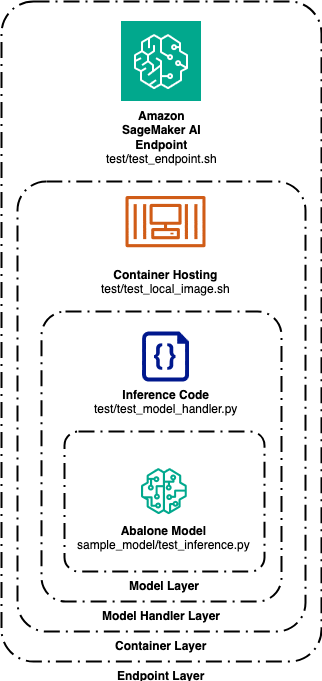
1. The innermost layer is the model layer. Testing at the model layer confirms the model can receive a vector of data points and return an output prediction. The sample_model/test_inference.py code file sends a vector of predefined data to the sample Abalone model after it’s been trained by sample_model/train_abalone.py. This test confirms the model can perform inference on new data.
2. The second layer is the model handler layer. Testing at the model handler layer confirms the model handler code can serve the model using the customer-specified framework (i.e. tensorflow, xgboost, etc.). This test loads the model into memory and executes inference in the same way it will do once packaged in the container.
3. The third layer is the container layer. This test builds the container, stands up the Flask or FastAPI server, and processes inference requests via the /invocations API endpoint. This is all done locally on port 8080 by default.
4. The fourth and outermost layer is the endpoint layer. This test requires the container to have been built and pushed to an ECR repository and subsequently deployed to an AWS SageMaker AI managed inference endpoint. To run this test, you must pass the endpoint name as a command-line argument to the script. This takes an inference request and sends it over the Internet to the endpoint which hosts the BYOC container you just built.
If all of these tests pass, you have successfully deployed a container to a SageMaker endpoint using the BYOC paradigm.
What ml-container-creator does not do well (yet)
The ml-container-creator project is meant to assist customers in deploying predictive inference models to SageMaker with ease. At launch time, it features limited capabilities for transformer-based containers, offering template container images for vLLM and SGLang only. Configuration support for transformer-based serving architectures and remote container builds are part of the roadmap.
How do I start using this package?
To start using ml-container-creator, download the repository from GitHub and navigate to the repository. Once there, install the necessary libraries and link the generator to your installation of npm. Then, call yo and select the generator from your list of installed generators.
Summary
By streamlining the BYOC deployment process, ml-container-creator empowers customers, both new and experienced, to focus on their core machine learning challenges and rapidly bring their predictive models to production. This open source project furthers the goal of making machine learning more accessible and efficient for businesses of all sizes. We welcome feedback and contributions from the community. Please join us at awslabs/ml-container-creator, using issues, contributing code, identifying bugs, or proposing roadmap items.