AWS Quantum Technologies Blog
Amazon Braket Introduces Spending Limits for Quantum Processing Units
This post was contributed by Dimitar Trenev, Vivek Dwivedi, and Zia Mohammad
Customers from research institutions, educational organizations, and development teams asked us for a better way to control quantum processing unit (QPU) cost while exploring quantum computing applications. With this launch, Amazon Braket now supports spending limits, which enables you to set maximum spending thresholds on a per-QPU basis to manage costs proactively. When a spending limit is enabled, Braket is designed to keep track of your cumulative charges on the selected device and reject tasks that would exceed the defined spending limit.
Spending limits apply only to on-demand quantum tasks on QPUs. They do not include costs for simulators, managed notebook instances, and Hybrid Job instances or quantum tasks created during reservations. For cost management across all Amazon Web Services (AWS), including simulators and classical compute, continue using the AWS Budgets feature of AWS Cost Management.
In this post, we explain how spending limits work, show you how to configure them, and demonstrate their application across different use cases.
Understanding spending limits
Spending limits can be used with all QPUs supported on Braket and each spending limit is associated with a particular device. When you create a spending limit for a device, you establish a maximum dollar amount you can spend on that QPU. Amazon Braket tracks your cumulative spending and validates every task creation request against your configured limit. If a task’s estimated cost exceeds your remaining spending limit, Braket rejects the task immediately with a validation error.
Amazon Braket calculates estimated quantum task costs based on the QPU list price and requested shots, deducting this amount from your spending limit at task creation. If a task completes with fewer successful shots than requested, the unused portion is returned to your spending limit. Canceling a task before execution returns the full estimated cost to your spending limit.
You can optionally configure a time period for your spending limit. By configuring a time period, you can ensure that tasks can only be submitted in the specified period. Tasks submitted outside the time period will be rejected. This is useful, for instance, if you have AWS credits that expire at a certain point in time or you want to make sure that you stay within a specific billing cycle.
Configuring spending limits
You can create and manage spending limits through the Amazon Braket Management Console, AWS Command Line Interface (CLI), or the AWS Software Development Kit (SDK). Figure 1 shows the console view with a visual interface for viewing QPU-specific spending limits displaying your current spending, queued spending (estimated costs for tasks waiting in the device queue), and remaining spend in real-time. This visibility helps you understand your current spending relative to your limit and make informed decisions about upcoming workloads.
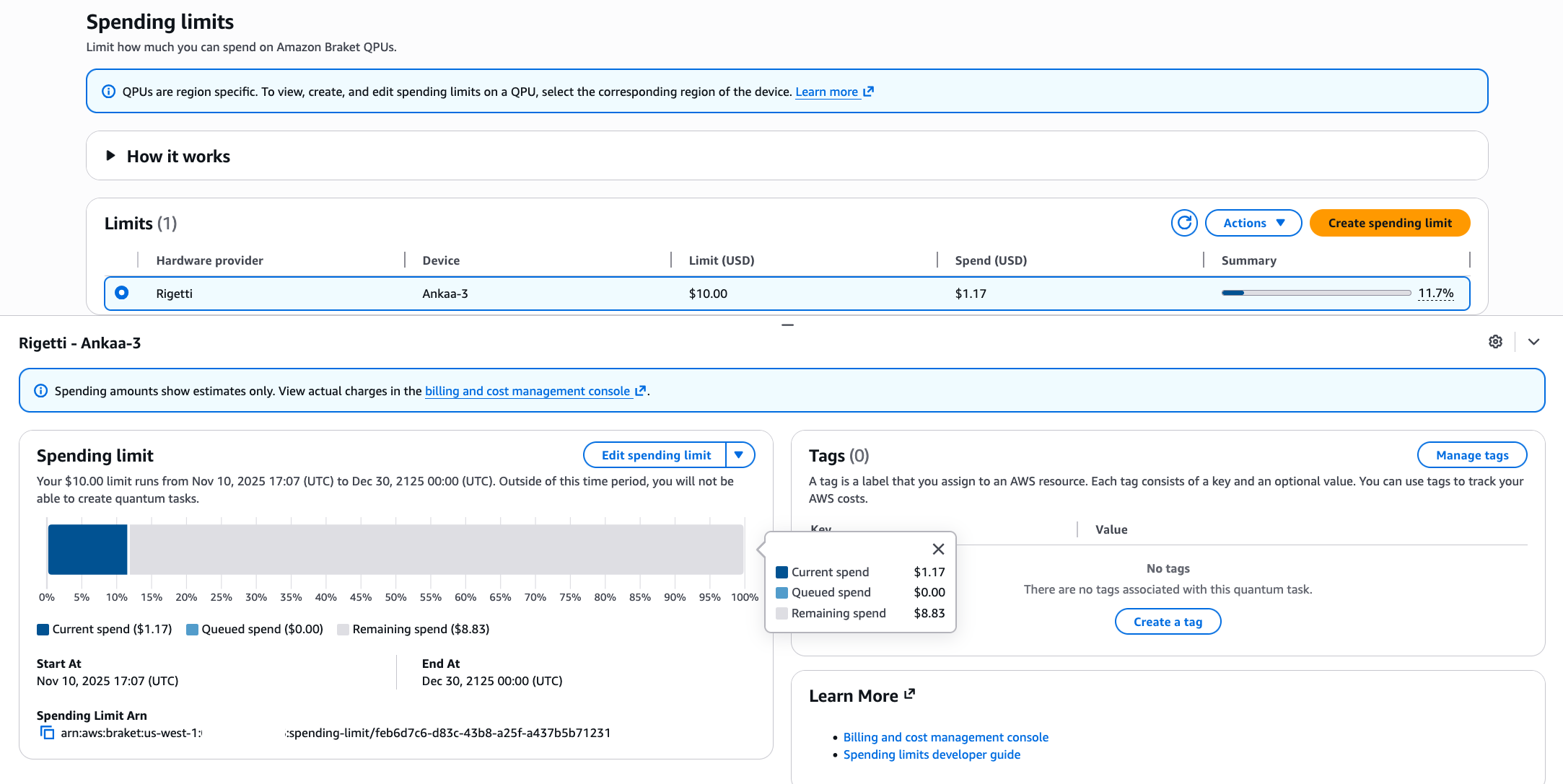
Figure 1: Braket console’s spending limits dashboard showing the configured limit, current spending, and available spending limit for a selected device
The AWS CLI offers command line access for automation and scripting while the AWS SDK enables you to programmatically set and manage spending limits for custom applications.
Any of these three can be used to interact with spending limits to accommodate your requirements. To remove spending restrictions entirely, delete the spending limit.
Applications of spending limits
“With more than 4,000 researchers leveraging Pawsey’s resources, we require capabilities that enable fair allocation of quantum computing budgets across diverse projects and teams while maintaining strong cost governance. It’s essential to ensure that no single workload consumes unplanned resources intended for the broader research community.”
— Ugo Varetto, Chief Technology Officer of Pawsey Supercomputing Research Centre
Organizations building platforms on top of Amazon Braket can use spending limits to manage costs for their end users. The Amazon Braket API enables platforms to create spending limits programmatically, allocate quantum computing budgets, and enforce these limits automatically.
Research teams exploring quantum algorithms can set conservative spending limits during the initial development phases. As teams gain confidence in their approaches, they can adjust limits to accommodate larger-scale experiments. This approach prevents mistakes during the exploratory phase while maintaining flexibility for production workloads. Different spending limits can also be allocated to different devices based on usage patterns and priorities.
Universities and training programs using Amazon Braket for quantum computing courses can create spending limits that align with course budgets, ensuring students gain hands-on experience with real quantum hardware without risking budget overruns. If a student accidentally configures a task with an excessive number of shots, the spending limit prevents the task from executing and provides immediate feedback about the cost implications.
Getting started
Spending limits are available at no additional cost in all AWS Regions where Amazon Braket is available.
To start using spending limits in your own workflows, head over to the Amazon Braket Management Console to create, monitor, and adjust spending limits. For an example on how tasks are accepted or rejected based on your settings check out the Spending Limits Introduction Notebook, which also demonstrates how you can manage spending limits through the AWS SDK.