Networking & Content Delivery
Configuring the AWS WAF Anti-DDoS managed rule group for your resources and clients
Users wanting to protect themselves from Layer 7 (HTTP) DDoS threats can use the AWS WAF L7 Anti-DDoS managed rule group to detect and mitigate DDoS events in single digit seconds. The Anti-DDoS managed rule group has a default configuration that is appropriate for many applications and clients. However, there are clients that need special attention. Browser-based Single Page Applications (SPAs) making fetch requests, and native mobile applications making API requests, do not support all mitigations and may have their requests inadvertently stopped during a detected event. In this post we provide guidance on how to tune your web access control list (web ACL) for different kinds of clients and resources to optimize your DDoS protection and user experience.
How AWS WAF Anti-DDoS managed rule group trades off mitigation effectiveness with end-user impact
When the Anti-DDoS managed rule group is added to your AWS WAF web ACL configuration, it quickly learns your traffic patterns and establishes baselines for each protected resource. It identifies anomalies by comparing current traffic to these baselines, assigning suspicion scores to requests for use in mitigations. By default, requests designated low and medium suspicion have a soft mitigation in the form of a silent JavaScript-based browser challenge. This challenge is imperceptible to legitimate users but significantly increasing resource costs for threat actors. Requests designated as high suspicion of contributing to DDoS attacks have a hard mitigation in the form of being blocked even if they have completed a challenge.
The Anti-DDoS managed rule group defines challengeable requests as those using the GET method for URIs that do not match the Exempt URI regular expression (URIs that can’t handle a silent JavaScript challenge). These requests are assigned the label awswaf:managed:aws:anti-ddos:challengeable-request. All other requests are non-challengeable.
The AWS WAF Challenge action is the soft mitigation for challengeable requests. By default, challengeable requests with the header Accept: text/html receive a JavaScript payload that completes a task and issues a token/cookie. Then, the user is redirected back to their original page. Figure 1 shows this as a sequence diagram, and subsequent requests automatically include this cookie. Challengeable requests for other content types receive an HTTP 202 Request Accepted status and cannot proceed because the challenge is not completed. Further details on how the challenge works can be found in this AWS Networking and Content Delivery post.
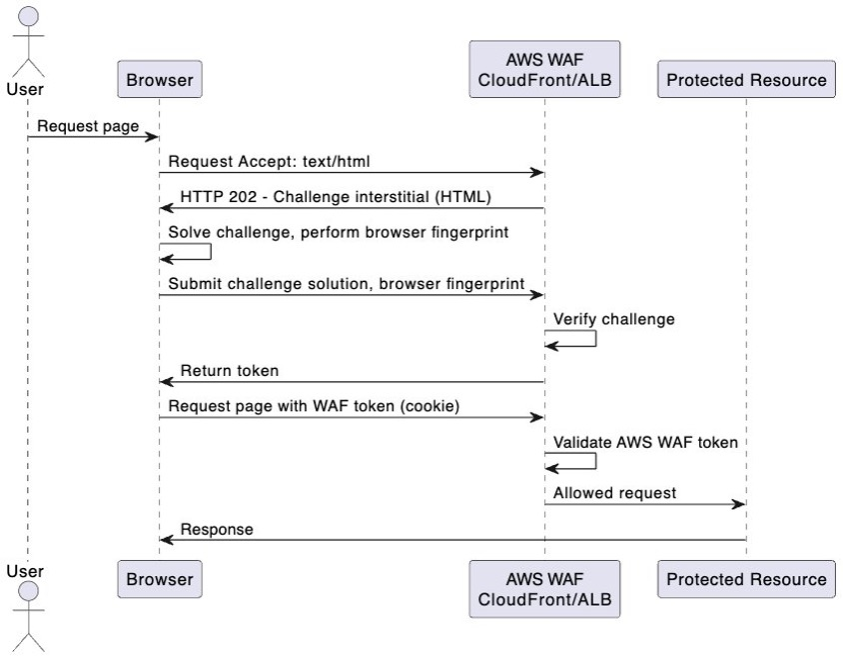
Figure 1: Sequence diagram of the interstitial challenge interaction between a user, their browser, and AWS WAF protecting a resource
The use of soft and hard mitigations helps balance the effectiveness of DDoS mitigation with the impact to legitimate users during DDoS events.
You may have considered minimizing the impact to legitimate users using clients that do not support this sequence by disabling the challenge or reducing the sensitivity of the block action as shown in Figure 2. This introduces the risk that your resource may be inadequately protected against DDoS attacks, or legitimate users are finding their falsely identified requests blocked due to increased sensitivity.
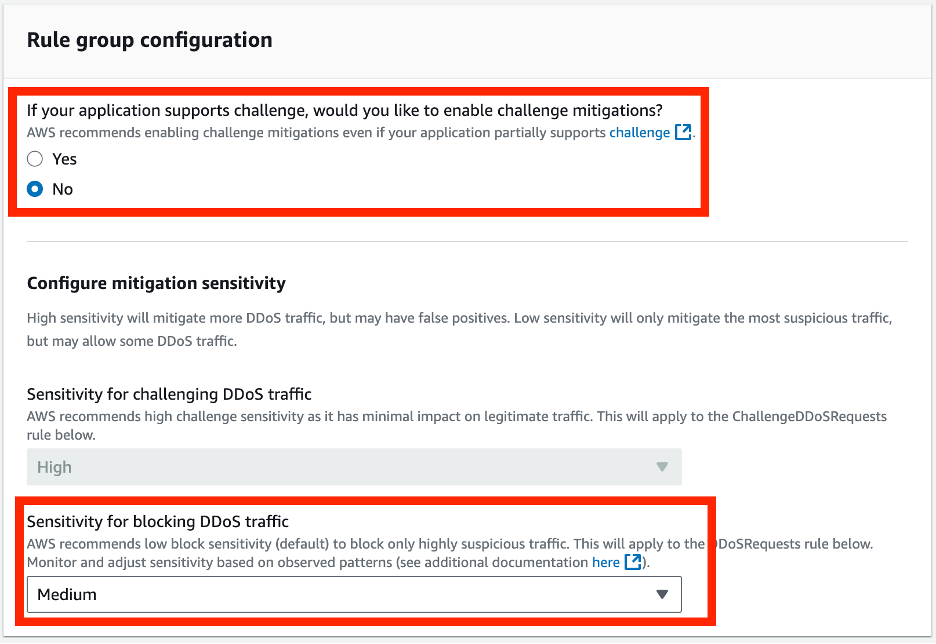
Figure 2: AWS WAF Anti-DDoS managed rule group configuration to disable the challenge
There are a number of rules and configuration options in the Anti-DDoS managed rule group that enable you to find the right trade-off between resource availability during a DDoS attack and the experience of your legitimate users who may or may not support the challenge soft mitigation. The flow chart in Figure 3 shows how the Anti-DDoS managed rule group works based on the incoming request and rule group configuration. The following section details how you can change the rule group configuration in a way that best makes the trade-off between your user experience and resource sensitivity during a DDoS attack.
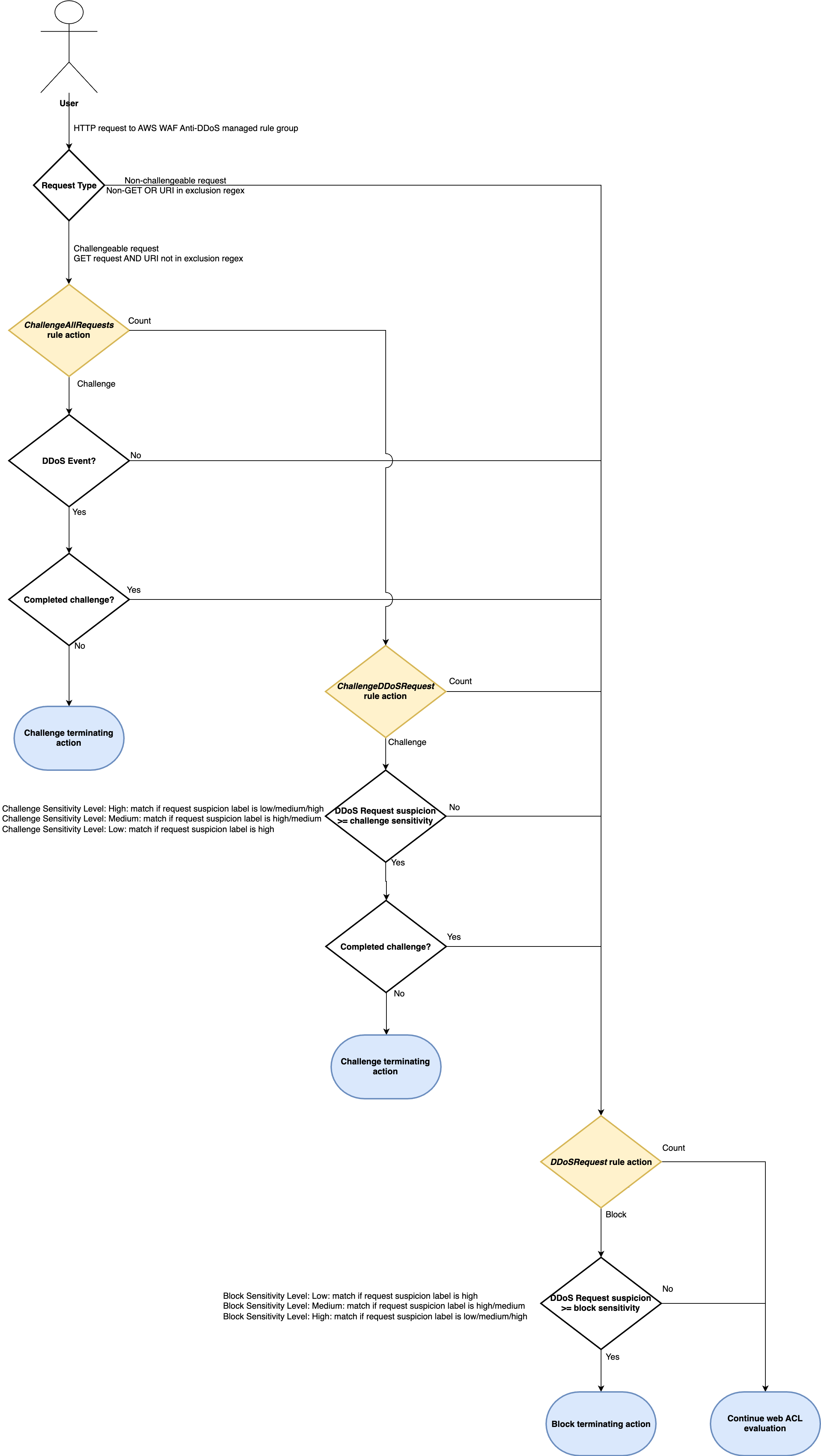
Figure 3: Flow diagram for how the AWS WAF Anti-DDoS managed rule group evaluates each rule
Scenario 1: your clients or request types don’t support the challenge
The default Anti-DDoS managed rule group configuration sets the ChallengeAllDuringEvent rule to the challenge. Legitimate users experience disruption if they are making challengeable requests from unsupported clients during a DDoS event.
The solution that offers the best experience for your users is to allow their clients to complete the challenge. The AWS WAF client integrations proactively complete a challenge and acquire a token as part of loading your resource outside of DDoS events. These SDKs need the AWS WAF Targeted Bot Control AMR to be deployed in the web ACL. All requests can now be treated as challengeable by the Anti-DDoS managed rule group.
There are two options:
JavaScript SDK: This SDK is suited for browser-based applications. This is achieved by embedding JavaScript in the HTML head of your application so that the challenge completes during page load. The cookie is automatically sent in subsequent requests.
Mobile SDK: This SDK is available for both Android and iOS. The underlying workflow is similar to the JavaScript SDK as described in the AWS Developer Guide. If you have other types of clients that cannot use these SDKs (for example, machine-to-machine communication), then you cannot treat all requests as challengeable and must review the next scenarios for handling non-challengeable requests.
If you operate across domains (for example an SPA www.company.com makes fetch requests to api.company.com), then you also need to configure the token domain correctly. This post covers different scenarios for cross domain configurations.
The solution that gives your resource the most protection from DDoS requests is to make all requests challengeable. Figure 4 shows relaxing the Exempt URI regular expressions to \x00 to match no requests. The challenge no longer breaks API requests and static assets such as images, because all requests include the token when using SDK.

Figure 4: AWS WAF Anti-DDoS managed rule group configuration to challenge all requests
Non-GET (for example POST/PUT/DELETE) requests continue to be defined as non-challengeable by the Anti-DDoS managed rule group. However, the client integrations now include the token, which means they pass a challenge. You can make sure that clients making these requests have completed a challenge by adding the following rule after the Anti-DDoS managed rule group to challenge requests matching the DDoS event label (awswaf:managed:aws:anti-ddos:event-detected) for non-GET HTTP methods.
{
  "Name": "ChallengeNonGetDuringDDoSEvent",
  "Priority": 100,
  "Action": {
    "Challenge": {}
  },
  "VisibilityConfig": {
    "SampledRequestsEnabled": true,
    "CloudWatchMetricsEnabled": true,
    "MetricName": "ChallengeNonGetDuringDDoSEvent"
  },
  "Statement": {
    "AndStatement": {
      "Statements": [
        {
          "NotStatement": {
            "Statement": {
              "ByteMatchStatement": {
                "FieldToMatch": {
                  "Method": {}
                },
                "PositionalConstraint": "EXACTLY",
                "SearchString": "GET",
                "TextTransformations": [
                  {
                    "Type": "NONE",
                    "Priority": 0
                  }
                ]
              }
            }
          }
        },
        {
          "LabelMatchStatement": {
            "Scope": "LABEL",
            "Key": "awswaf:managed:aws:anti-ddos:event-detected"
          }
        }
      ]
    }
  }
}
Scenario 2: Our clients cannot use the AWS WAF client integrations
In this scenario, you with the trade-off of either impacting legitimate users using clients that cannot support the challenge or stopping DDoS requests that may impact the availability of your resource. Depending on the extent to which you are willing to impact legitimate users, you can start by changing the default rule group configuration. The following configuration options are ordered from highest to lowest in terms of providing your application with the most protection against DDoS attacks by relaxing the challenge soft mitigation as little as possible:
- Permitting non-suspicious requests without challenge during an event: Changing the ChallengeAllDuringEvent rule to Count means that your legitimate users’ non-suspicious requests are no longer challenged during a DDoS event. All suspicious requests are still challenged by the ChallengeDDoSRequests rule. Legitimate users making non-suspicious requests from native mobile applications and SPA
fetchrequests are no longer impacted. This trades off inconvenience for legitimate users falsely identified as making suspicious requests in exchange for stronger protection for your protected resource. - Permitting more suspicious requests without challenge: If you are still concerned about legitimate users being falsely identified as sending low suspicion requests, then you can change the Challenge sensitivity to Medium. Requests from users with low suspicion are permitted so that your legitimate users are less likely to be impacted. Requests with medium suspicion are still challenged. This may be an acceptable trade-off for mobile clients that cannot support challenge and if you are concerned about low suspicion requests impacting legitimate users.
- Not challenging more endpoints: If you are unable to support the challenge, then add the minimal number of endpoints to this expression to permit your legitimate users through, while still using a soft mitigation for other endpoints that support the challenge. Consequently, you may find that a large volume of non-challengeable requests overwhelms your sensitive protected resource.
These options improve the user experience because users are less likely to be impacted by the challenge. At a certain scale this may mean either too few DDoS requests are blocked, or too many legitimate users are impacted by a challenge that they cannot complete. The following scenario offers a solution for this.
Scenario 3: Non-challengeable requests overwhelm your resource before they’re blocked
You may still have a certain volume of non-challengeable requests, especially if the challenge mitigation is disabled or when you have limited ability to use the AWS WAF client integrations. Non-challengeable requests are always permitted until they reach the DDoS block sensitivity (high by default). This means that sensitive endpoints may be overwhelmed with low or medium suspicion requests because the soft mitigation isn’t applied. The following common use-cases need special consideration:
- POST requests for form submissions (such as from HTML pages)
- Single Page Apps (for example React) making fetch requests to API endpoints, particularly for endpoints that put load on your server
- Native mobile applications making requests to API endpoints
- Machine-to-Machine requests to API endpoints
- Requests for images or other static assets that overwhelm your resource
GET requests are made non-challengeable by the Exempt URI regular expressions than by default excludes /api and static assets. We recommend that you reduce the scope of this expression to make sure that as many requests can be challenged as possible. You have two options if this isn’t possible:
-
- Update the DDoS block sensitivity from low to medium (or high): Medium and high suspicion requests are blocked, ideally before impacting your resource negatively. Setting the block sensitivity to high also blocks low suspicion requests. This limits accessibility for legitimate users incorrectly identified with medium (or low) suspicion DDoS requests but maintains broader availability.
- Create an alternative soft limit by limiting the volume of non-challengeable requests during an event: Rather than negatively impacting your potentially legitimate users by blocking low/medium suspicion DDoS requests, you can create a rate-based rule that limits the number of non-challengeable suspicious requests allowed during a DDoS event. You can use an aggregation key such as IP, users (for example using the
Authorizationheader), or a specific sensitive endpoint URI (for example an endpoint that completes an expensive database query).The following rule added after the Anti-DDoS managed rule group limits suspicious non-challengeable requests from a user (based on theAuthorizationheader) to 10 requests per minute. Legitimate users with low/medium suspicion requests can still interact with your resource, while still limiting the volume of suspicious requests reaching your protected resource.{ "Name": "RateLimitSuspiciousUserRequests", "Priority": 100, "Action": { "Block": {} }, "VisibilityConfig": { "SampledRequestsEnabled": true, "CloudWatchMetricsEnabled": true, "MetricName": "RateLimitSuspiciousUserRequests" }, "Statement": { "RateBasedStatement": { "Limit": "10", "AggregateKeyType": "CUSTOM_KEYS", "EvaluationWindowSec": 60, "CustomKeys": [ { "Header": { "Name": "Authorization", "TextTransformations": [ { "Type": "NONE", "Priority": 0 } ] } } ], "ScopeDownStatement": { "AndStatement": { "Statements": [ { "LabelMatchStatement": { "Scope": "LABEL", "Key": "awswaf:managed:aws:anti-ddos:ddos-request" } }, { "NotStatement": { "Statement": { "LabelMatchStatement": { "Scope": "LABEL", "Key": "awswaf:managed:aws:anti-ddos:challengeable-request" } } } } ] } } } } }
Scenario 4: Challengeable requests overwhelm your resource before DDoS requests are blocked
A threat actor may be able to overcome challenges, leading to low and medium suspicion requests overwhelming your server before they can blocked as high suspicion requests. This may be an issue if a GET request for HTML pages puts sufficient load on your server (for example a listing page that undertakes an expensive database query). You have three options:
- Update the DDoS block sensitivity from low to medium (or high): Medium and high suspicion requests are blocked, ideally before it negatively impacts your resource. Setting block sensitivity to high will also block low suspicion requests. This limits accessibility for legitimate users incorrectly identified with medium (or low) suspicion DDoS requests but maintains broader availability.
- Create an alternative soft mitigation by blocking suspicious DDoS requests to sensitive endpoints: Rather than blanket blocking challengeable low/medium DDoS requests, you can create a rule that matches the
awswaf:managed:aws:anti-ddos:ddos-requestlabel and blocks these known requests from targeting specific sensitive endpoints. The following rule applied after the Anti-DDoS managed rule group blocks identified DDoS requests that are for the sensitive URI endpoint/products/list.{ "Name": "BlockSensitiveEndpointsDDoS", "Priority": 100, "Action": { "Block": {} }, "VisibilityConfig": { "SampledRequestsEnabled": true, "CloudWatchMetricsEnabled": true, "MetricName": "BlockSensitiveEndpointsDDoS" }, "Statement": { "AndStatement": { "Statements": [ { "ByteMatchStatement": { "FieldToMatch": { "UriPath": {} }, "PositionalConstraint": "EXACTLY", "SearchString": "/products/list", "TextTransformations": [ { "Type": "NONE", "Priority": 0 } ] } }, { "LabelMatchStatement": { "Scope": "LABEL", "Key": "awswaf:managed:aws:anti-ddos:ddos-request" } } ] } } } - Require CAPTCHA completion during an event: If your resource is particularly sensitive to DDoS attacks, or you have no tolerance for negatively impacting legitimate users, then you can demand a CAPTCHA be completed. This CAPTCHA significantly increases the resource costs for a threat actor. The following rule added after the Anti-DDoS managed rule group forces users to complete a CAPTCHA for challengeable requests that match the event detected label (
awswaf:managed:aws:anti-ddos:event-detected). Legitimate users can still engage with your resource. CAPTCHA attempts are charged at the standard rate. Further details on CAPTCHA and how to integrate can be found in this AWS Networking and Content Delivery post.{ "Name": "CAPTCHADDoSEvent", "Priority": 8, "Action": { "Captcha": {} }, "VisibilityConfig": { "SampledRequestsEnabled": true, "CloudWatchMetricsEnabled": true, "MetricName": "CAPTCHADDoSEvent" }, "Statement": { "AndStatement": { "Statements": [ { "LabelMatchStatement": { "Scope": "LABEL", "Key": "awswaf:managed:aws:anti-ddos:event-detected" } }, { "LabelMatchStatement": { "Scope": "LABEL", "Key": "awswaf:managed:aws:anti-ddos:challengeable-request" } } ] } } }
Conclusion
In this post we described how the new AWS WAF Anti-DDoS managed rule group uses soft and hard mitigations to achieve a balance between the availability of a resource and the user experience of legitimate users. We described situations commonly encountered when using these mitigations with different clients, and explained how to effectively trade off user experience with mitigation effectiveness even if clients cannot support challenges.
If you still have concerns about your ability to respond to sophisticated DDoS threats, then consider AWS Shield Advanced. Shield Advanced provides 24/7 access to the Shield Response Team (SRT) working with you to deploy custom mitigations to specific DDoS threats.
About the authors

David MacDonald
David is a Senior Solutions Architect focused on helping New Zealand startups build secure and scalable solutions. He has spent most of his career building and operating SaaS products that serve a variety of industries.

Joanna Knox
Joanna is a Senior Cloud Support Engineer at AWS in Sydney Australia. With a background in network engineering, application delivery and security, she focuses on helping customers architect themselves to be resilient against DDoS and other security threats, as well as helping customers actively under DDoS. Outside of work she likes to DJ and cook.